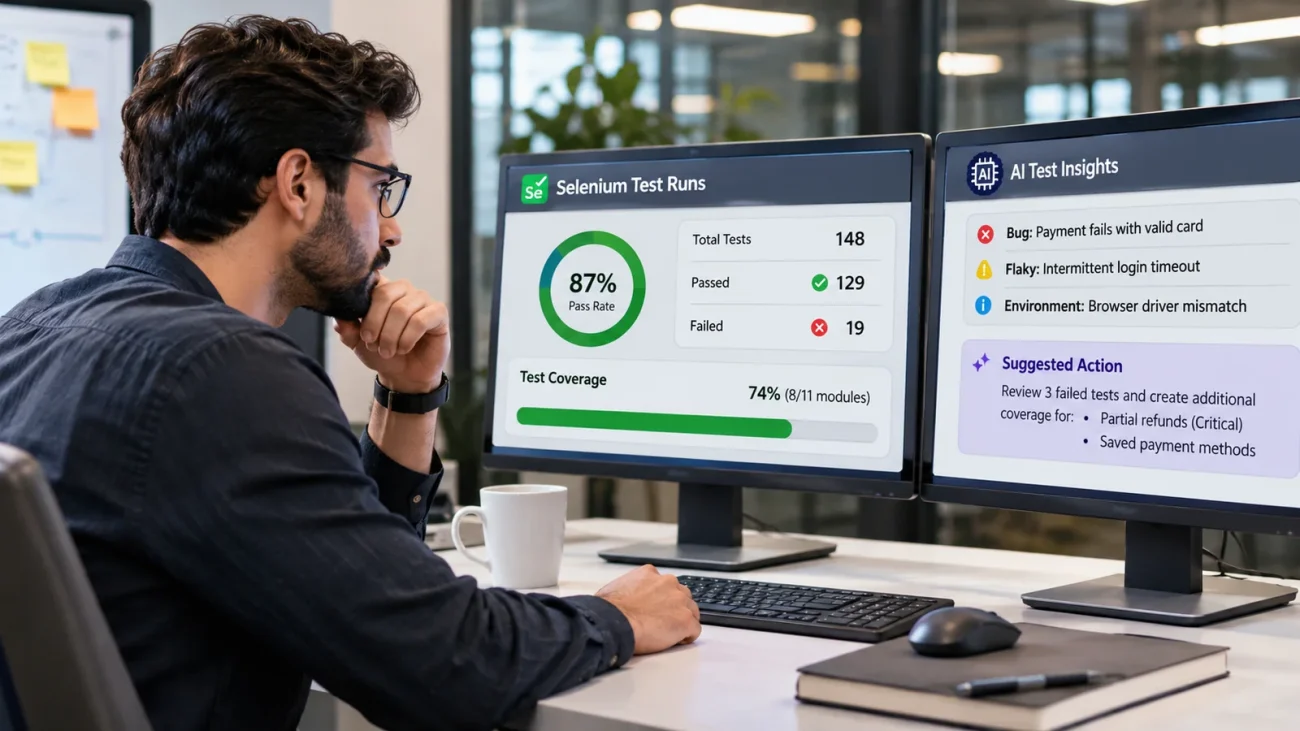
You get up on release day to a green dashboard and everything has passed. You just have one question: Are we covered for this release? The room falls silent.
Does a Passing Run Mean the Product Is Covered?
Not quite. Whilst Selenium uses a browser and provides you with information on what passed there will not be any information on what this proves. This is where the AI testing tool for Selenium comes in when planning for QA. The test to load the checkout page and check the title may run lots of code but does not prove anything about whether the customer can pay.
Code Coverage or Test Coverage: Which Counts?
The difference between code coverage and test coverage for Selenium scripts is that code coverage will tell you what lines of code were executed within your application. Test coverage will tell you what requirements were proved. If your manager asks if you are covered for this release they are asking if your requirements are covered. Code coverage will not give you this information. The existing code coverage tools will remain useful.
Where Do Selenium Results Fall Short?
There are three main issues that occur. Your CI will clean up your artifacts at set times meaning if there was an error six weeks ago there will be no files to open. The retry analyser will pick up on the obvious flaky test but all the errors from last night could take you a whole morning. This is where the AI testing tool for Selenium comes in. There is no connection between your requirements in your issue tracker and your tests in your repo.
What Can AI Add Without Changing the Suite?
By adding one layer on top, it will look at each run and categorise the errors into bugs, flakes or environmental errors. Testsigma reads each run and sorts failures into bug, flake or environment. Each category will be decided based on the error type, retry pattern and history. The reports will be kept for a retention period set by the team. The two way sync will pull in stories so you know what each test proves. Now you have test coverage for Selenium scripts. Teams can add new cases from a story or description. These can be approved before being added to live. One thing to note is that existing locators will not be healed as healing only applies to tests written within the Testsigma software. No rewriting is needed to get started with the AI testing tool like Testsigma.
How Do the Options Compare?
| Task | Selenium alone | Plus a coding assistant | AI testing platform |
|---|---|---|---|
| Triaging a nightly run | Manual | Manual or per failure | Every failure classified |
| Run history | Until artifacts expire | No | Kept on set terms |
| Requirement coverage | No | No | Mapped through the tracker |
| Manual tests | Nowhere | Nowhere | Same list as automated |
What Does a Release Readiness View Look Like?
Imagine having a sprint report that shows you 74% coverage (8/11 modules) and 87% pass rate (148 tests). The two clear issues are there are no test cases for partial refunds (critical) and no coverage for saved payment methods. However, the login flow is fully covered. This gives you something to talk about with your team and shows you all the areas that are missing.
Conclusion
Selenium will not go away and the suite will run as normal. By adding a smart layer on top you are simply adding in the missing logging. With good support for the AI testing tool you can finally answer questions around your tests. If you turn it off your tests will still run.
